


Wide Band Logging thru EGR using UVScan.






 Wide Band Logging thru EGR using UVScan.
Ok here is my step by step on getting UVscanner to log your wideband O2 by using your egr port.
Wiring:
Step 1) Have a wide band 0-5 volt output and a disconnected/not in use EGR connector.
Step 2) Locate the middle wire on the EGR connector. this should be brown and labeled C. It is the EGR position signal wire. Connect the wideband 0-5v wire to this location.
Software:
Of the three version of UVscan that I have, the most stable version is labeled "UVSCAN_10_18_08" Included in this is a PID editor. Following its directions and info I found in later versions of UVScan, I added the PID for EGR Voltage. The following is step by step via screen shot on how to update the files to access the new PID. I have also included a zip with these files.
1) First locate the folder that UVscan is installed in and open it. It should look like this:
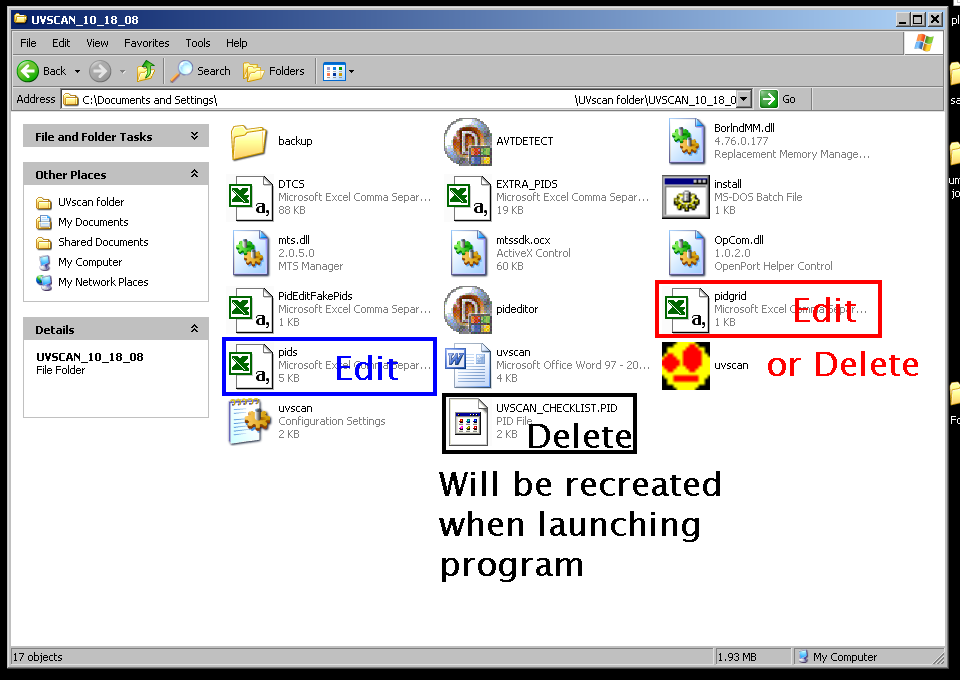
You will need to delete one file, and edit or replace the other two. If you choose to edit them, the following two pictures will show the lines that were added in. Caution! when adding information to the PID.csv file, do not change the order that they are arranged. this is why i added it at the very end. I tried to sort them using excels sort feature and the data on the next log showed 10,000* of KR when i was at the drag strip! the program must look at lines and columns vs the sorted order of the information. either way save yourself the frustration and just add it at the bottom.
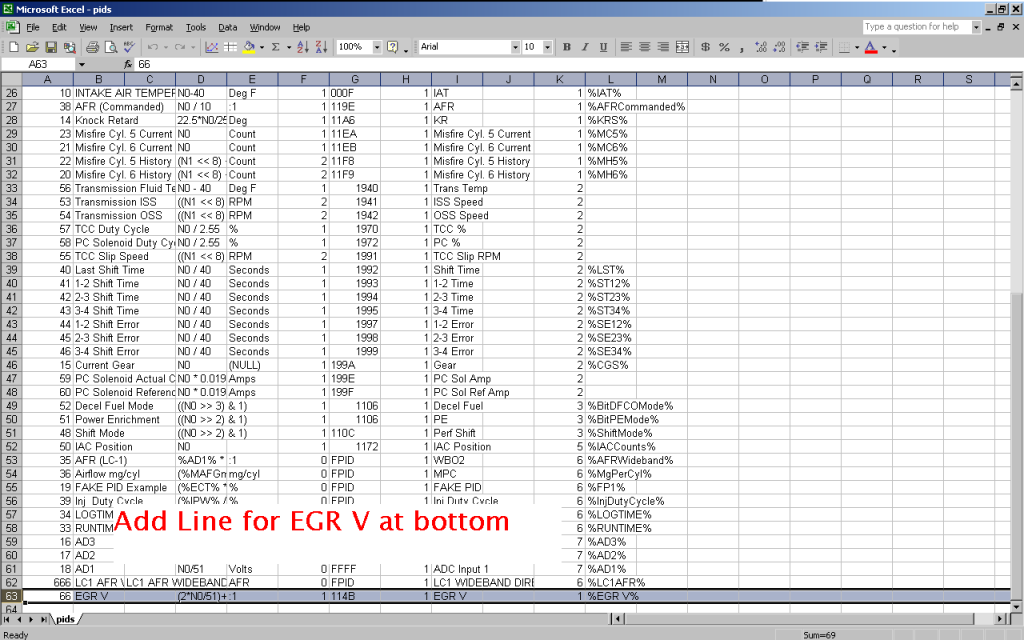
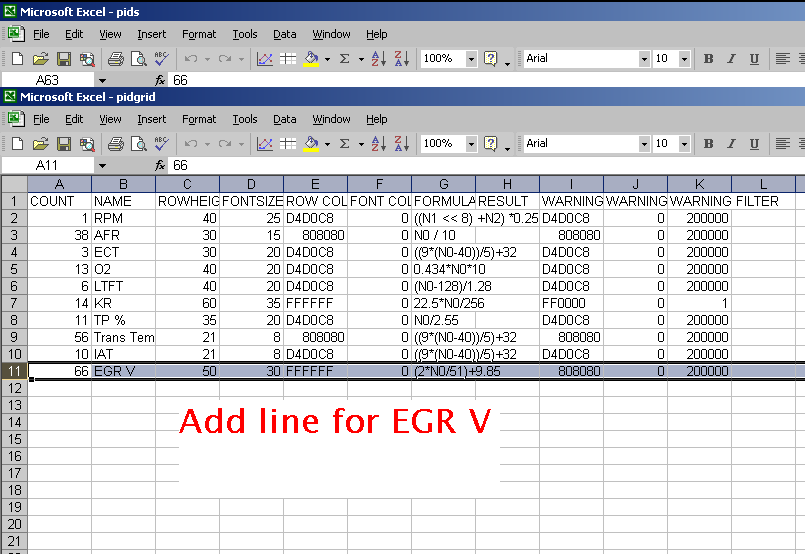
Ok and here are the files attached at the bottom
Wiring:
Step 1) Have a wide band 0-5 volt output and a disconnected/not in use EGR connector.
Step 2) Locate the middle wire on the EGR connector. this should be brown and labeled C. It is the EGR position signal wire. Connect the wideband 0-5v wire to this location.
Software:
Of the three version of UVscan that I have, the most stable version is labeled "UVSCAN_10_18_08" Included in this is a PID editor. Following its directions and info I found in later versions of UVScan, I added the PID for EGR Voltage. The following is step by step via screen shot on how to update the files to access the new PID. I have also included a zip with these files.
1) First locate the folder that UVscan is installed in and open it. It should look like this:
You will need to delete one file, and edit or replace the other two. If you choose to edit them, the following two pictures will show the lines that were added in. Caution! when adding information to the PID.csv file, do not change the order that they are arranged. this is why i added it at the very end. I tried to sort them using excels sort feature and the data on the next log showed 10,000* of KR when i was at the drag strip! the program must look at lines and columns vs the sorted order of the information. either way save yourself the frustration and just add it at the bottom.
Ok and here are the files attached at the bottom









So when logging / scanning data it can also record the AFR the whole time as well. So when you play back to watch and make adjustments you know what your fuel was doing as we'll. Very handy!
Yes when tuning you can now see your true afr so when looking at Kr you can see if your rich or lean. If your lean then you need to add fuel. If rich and kr'ing your running too much timing or something else is causing the kr. Very helpful in fine tuning a car. You can also target a specific afr to make more power. 12.5:1 is the best ratio for power on gas. It's prob a bit leaner with the ethanol they add in now. But most with boost target 11.5-12.0. NA most aim for 12.0-12.5

Thread
Thread Starter
Forum
Replies
Last Post
