

View Poll Results: Do you like the Monthly `Blog ? (Multiple Choice)
Yes, I like the Monthly `Blog (It's always there)


8
29.63%
No, I prefer the daily Member's Blog


8
29.63%
It doesn't matter to me


10
37.04%
I can & will post a daily `Blog if no one else does.


4
14.81%
Multiple Choice Poll. Voters: 27. You may not vote on this poll
Member's BLOG: Month of January 2015, Check In




Monte Of The Month -- July 2011
Monte Of The Month -- December 2016
Monte Of The Month -- December 2016




Joined: Jan 2011
Posts: 7,524
From: St.Louis , MO.


Thank's Mel
Thank's
No they are stock tail lights
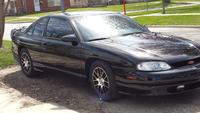
Good Afternoon EV1!
I have definitely had a trying day.
After spending the day yesterday in the cold damp garage changing out the front springs on the Monte (Lowering it).
Today...
I feel like crap! I got aches an pains in places I forgot I had...
Then,
I was getting up and mobilizing myself..I decided to use my indoor mobility scooter instead of my wheel chair.. In the process I park it by the couch out of the way. while wanting to enjoy my morning coffee. and BOOM/Crash the rear tire catchs the charging cord and pulls the laptop off the end table andf into the armrest (That's folded down) and into the steel exposed arm. I grabbed it a bit to late to save it.. well now it has a huge scrape and scratch(That's pretty deep) on the screen. as I pick it up..The screen is on... But No icons or background PIC! So, I manually restart it... (Holding down the power button for 5 seconds) I do know that in this mode... on the restart its gonna ask to start it normally (Its always highlighted) so I knew to hit enter...to restart it. It made all the right sounds, the screen light up in the previous grey color and... I also heard the usual windows music meaning it was starting up... However, I still had no Icons or background pic..
I was so pissed at myself ... I just left it alone... 1 and 1/2 hrs later WALLA! its back on! and its working as if nothing happened.. I did call my comp guy as I had planned to take it to him to fix it... and explained what just happened.... So, he said to restart it AND SEE IF IT WORKS. So I did
That's right you guessed it...
Its working flawlessly!
Heres my question: To all you computer guru's
What the heck happened and why did it decide to work again?
My comp guy..has NO idea why it "fixed" itself..
Jerry:
Like the new decal!
Have a Great Day EV1!
I look forward to someone answering my conundrum !
Space:
Hope all/you are well and hope to see ya back here soon!
We miss ya Buddy!
Peace/Out!
I have definitely had a trying day.
After spending the day yesterday in the cold damp garage changing out the front springs on the Monte (Lowering it).
Today...
I feel like crap! I got aches an pains in places I forgot I had...
Then,
I was getting up and mobilizing myself..I decided to use my indoor mobility scooter instead of my wheel chair.. In the process I park it by the couch out of the way. while wanting to enjoy my morning coffee. and BOOM/Crash the rear tire catchs the charging cord and pulls the laptop off the end table andf into the armrest (That's folded down) and into the steel exposed arm. I grabbed it a bit to late to save it.. well now it has a huge scrape and scratch(That's pretty deep) on the screen. as I pick it up..The screen is on... But No icons or background PIC!
So, I manually restart it... (Holding down the power button for 5 seconds) I do know that in this mode... on the restart its gonna ask to start it normally (Its always highlighted) so I knew to hit enter...to restart it. It made all the right sounds, the screen light up in the previous grey color and... I also heard the usual windows music meaning it was starting up... However, I still had no Icons or background pic..I was so pissed at myself ... I just left it alone... 1 and 1/2 hrs later WALLA! its back on! and its working as if nothing happened.. I did call my comp guy as I had planned to take it to him to fix it... and explained what just happened.... So, he said to restart it AND SEE IF IT WORKS. So I did
That's right you guessed it...
Its working flawlessly!
Heres my question: To all you computer guru's
What the heck happened and why did it decide to work again?
My comp guy..has NO idea why it "fixed" itself..
Jerry:
Like the new decal!
Have a Great Day EV1!
I look forward to someone answering my conundrum !
Space:
Hope all/you are well and hope to see ya back here soon!
We miss ya Buddy!
Peace/Out!

Afternoon all, got a call from the job i interviewed for a few weeks back and they decided to take someone else, surprised they even called, but they said i interviewed good which was good to hear.
 It was nice of them to call and let you know the results and that you did well.

David-
Wow! you've had quite the day!!! Not sure why computers do what they do half the time. I am glad it is back to fully functional
Wow! you've had quite the day!!! Not sure why computers do what they do half the time. I am glad it is back to fully functional
Thanks Barbara...
I know something about computers...but not enough to know why they do what they do.. (Does that make sense?) lol
But any help/insight would be appreciated.
I know something about computers...but not enough to know why they do what they do.. (Does that make sense?) lol
But any help/insight would be appreciated.

1) Sometimes a hard boot will help clear out problems (turning on then off the computer)
2) If it was a heat issue (cooling fan or faulty processor) letting it cool down will help
I would continue to keep an eye on it
David not knowing what your org. problem was I can only guess.
1) Sometimes a hard boot will help clear out problems (turning on then off the computer)
2) If it was a heat issue (cooling fan or faulty processor) letting it cool down will help
I would continue to keep an eye on it
1) Sometimes a hard boot will help clear out problems (turning on then off the computer)
2) If it was a heat issue (cooling fan or faulty processor) letting it cool down will help
I would continue to keep an eye on it
My laptop stays on 24/7.
It merely slid off the end table and the screen hit the side of my mobility scooter... That's when the screen went blank. (Not off) I just couldn't see any icons or my pic in the background.
So I restarted it by shutting it down manually. as we all know it will restart using the screen that gives you different options like safe mode etc.. But start windows normally is always highlighted unless you change the setting. so I merely hit enter knowing that's the option that will be highlighted.
It went thru all the normal start up procedure/sounds etc...but still no icons or background pic...
I merely let it stay on and let it sit for around an hour and half...
And its been working ever since...
Thanks for the input Tadd.
By the way...
Installed the lowering spring in the front yesterday..

Monte Of The Month -- April 2015

Joined: May 2013
Posts: 3,052
From: Brockville Ontario
Good evening everyone, spent the day cruising around visiting clients and enjoying the sunshine, but not the cold, the wind was cutting right through everything. Not much up for this evening
David no clue on why computer related items do that sort of thing, it's almost like they have a mind of their own at times and they almost seem to have a seizure and need to reboot to get back to normal.
David no clue on why computer related items do that sort of thing, it's almost like they have a mind of their own at times and they almost seem to have a seizure and need to reboot to get back to normal.

