


How do you like me now?

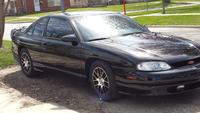

 Picks added a few posts down.../ Now the mrs wants to trade it in?
What do you think?
check further down...pics added !!!!
check further down...pics added !!!!
Last edited by STUMPMI; Jun 27, 2012 at 07:34 AM. Reason: finally got pics attached lol
Im not very computer savey..I have no clue how to use photobuket or to resize them..
Even if I could resize them..i have no idea what size to make them.....or how to do it...
The other pics I have were taken with my old phone....
These I took with my new sony cybershot camera....
Even if I could resize them..i have no idea what size to make them.....or how to do it...
The other pics I have were taken with my old phone....
These I took with my new sony cybershot camera....
Last edited by STUMPMI; Jun 25, 2012 at 11:47 PM.





Monte Of The Month -- March 2013




Joined: Jun 2010
Posts: 8,442
From: michigan
LINKResize a picture using Paint
Applies to all editions of Windows 7.
To resize a picture using Paint
Open Paint by clicking the Start button , clicking All Programs, clicking Accessories, and then clicking Paint.
Click the Paint button , click Open, click the picture you want to resize, and then click Open.
On the Home tab, in the Image group, click Resize.
In the Resize and Skew dialog box, select the Maintain aspect ratio check box so that the resized picture will have the same aspect ratio as the original picture.
If the Maintain aspect ratio check box is selected, you only need to enter the horizontal value (width) or vertical value (height). The other box in the Resize area is updated automatically.
Do one of the following in the Resize area, and then click OK:
To resize your picture by a certain percentage, click Percentage, and then enter a percentage to reduce the width by in the Horizontal box or a percentage to reduce the height by in the Vertical box.
To resize the picture so it's a specific size, click Pixels, and then enter a new width in the Horizontal box or new height in the Vertical box.
Click the Paint button , point to Save as, and then click the picture file type for the resized image.
Type a new file name in the File name box, and then click Save.
Applies to all editions of Windows 7.
To resize a picture using Paint
Open Paint by clicking the Start button , clicking All Programs, clicking Accessories, and then clicking Paint.
Click the Paint button , click Open, click the picture you want to resize, and then click Open.
On the Home tab, in the Image group, click Resize.
In the Resize and Skew dialog box, select the Maintain aspect ratio check box so that the resized picture will have the same aspect ratio as the original picture.
If the Maintain aspect ratio check box is selected, you only need to enter the horizontal value (width) or vertical value (height). The other box in the Resize area is updated automatically.
Do one of the following in the Resize area, and then click OK:
To resize your picture by a certain percentage, click Percentage, and then enter a percentage to reduce the width by in the Horizontal box or a percentage to reduce the height by in the Vertical box.
To resize the picture so it's a specific size, click Pixels, and then enter a new width in the Horizontal box or new height in the Vertical box.
Click the Paint button , point to Save as, and then click the picture file type for the resized image.
Type a new file name in the File name box, and then click Save.
Last edited by lougreen03; Jun 26, 2012 at 12:18 AM.


Hi `StumpMi,
"If 1st you don't succeed, try, try again", I'm still try'in & try'in again & refuse 2 give `Up & I hope you do the same..
Thanks Lou (Green) and member's for help'in a family member 4-Sure
Leaving this thread active in hope it helps others on resizing pic's they would like to share with the MCF..
*Notice, pictures that are 2 large for site & block our sponsors will have 2 be deleted "Without good sponsor's, we would not `be" here
  Oh `no
"If 1st you don't succeed, try, try again", I'm still try'in & try'in again & refuse 2 give `Up & I hope you do the same..
Thanks Lou (Green) and member's for help'in a family member 4-Sure
Leaving this thread active in hope it helps others on resizing pic's they would like to share with the MCF..
*Notice, pictures that are 2 large for site & block our sponsors will have 2 be deleted
"Without good sponsor's, we would not `be" here Oh `no
This is what I meant to show you....
Please click on the thumbs!
and tell me what you think....
the am on the left is 500D for the subs. (12s)
the 2nd is a 4200 Thunder
Both By MTX
Instahled By MTX there attached to back of the Sub Box..
Recommended by MTX...
I guess I should have opened the moon roof lol
PS thanks Lou!!!
Please click on the thumbs!
and tell me what you think....
the am on the left is 500D for the subs. (12s)
the 2nd is a 4200 Thunder
Both By MTX
Instahled By MTX there attached to back of the Sub Box..
Recommended by MTX...
I guess I should have opened the moon roof lol
PS thanks Lou!!!
Last edited by STUMPMI; Jun 26, 2012 at 01:29 PM.

