


Post from Photobucket?


 Post from Photobucket?
I got on photobucket can anybody tell me how to post pics from there to the forum cant figure it out Ive tried not to good at this I posted a few pics to the forum but rest keep failing cant figure it out so went to photobucket Thanks Butch and Heartbeat.





right click on your photo from photo bucket copy the url address (will be HTP something)
Go to the fourm chose the add image icon and paste the picture's location in the prompt and save
Go to the fourm chose the add image icon and paste the picture's location in the prompt and save



Joined: Sep 2010
Posts: 1,231
From: St. Louis, Missouri
 And ALL I GET IS THIS RED X!!!!! Why can't I make Photobucket work? By the way, Tadd, you left out several steps: there's TWO http choices listed when you click on the pic, one says "IM or email" the other says "direct link".
Last edited by Possum; May 8, 2012 at 07:48 AM.



You must select the "IMG" code and copy it to here.
The HTTP is a simple link to send others to that page. You can use the HTTP link and put it between [ quot3 ] and [/ quot3] replace 3's with e's.
The HTTP is a simple link to send others to that page. You can use the HTTP link and put it between [ quot3 ] and [/ quot3] replace 3's with e's.

Monte Of The Month -- August 2012
Joined: Apr 2011
Posts: 6,074
From: Seattle
^This^
The process may be different depending on what OS/Browser you use, but (using Win7/IE9) all I do is point at the pic and a window opens with the link choices in it. Then I left click my choice and it copies it to the clipboard. The last link in the list ( [IMG] ) pasted into your post will display the image.
The process may be different depending on what OS/Browser you use, but (using Win7/IE9) all I do is point at the pic and a window opens with the link choices in it. Then I left click my choice and it copies it to the clipboard. The last link in the list ( [IMG] ) pasted into your post will display the image.
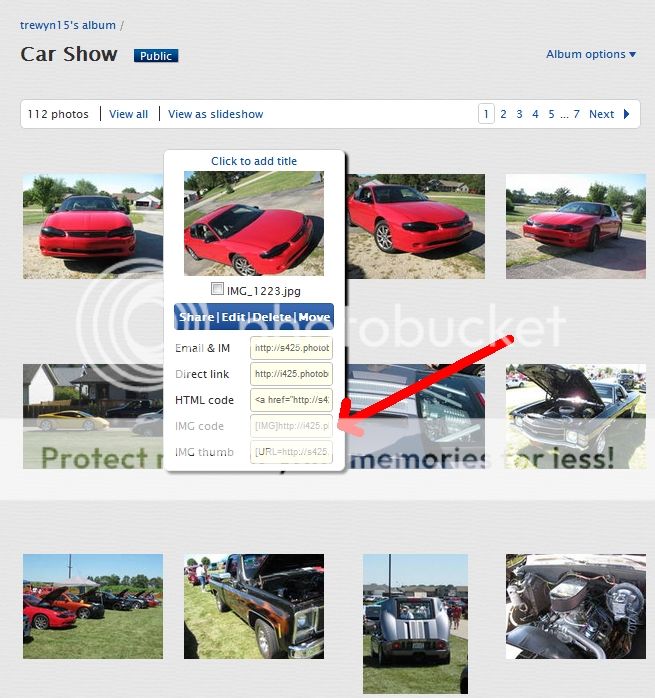
Here:
https://montecarloforum.com/forum/of...53/#post456015
Just made that thread, hopefully it helps.

awesome! glad I can help... this next stage is what we call 'pic whoring'  it's okay... once you start you can't stop, and we all do it
it's okay... once you start you can't stop, and we all do it

