

MCF Website Problems & Issues This area is for problems or suggestions relating specifically to the MCF site, not the car.

Posting pics

Thread Tools
 
Search this Thread
 
Old Apr 10, 2015 | 03:05 AM
  #1  
02ssintimidator's Avatar
Thread Starter
|
Monte Of The Month -- July 2015
Joined: Mar 2015
Posts: 893
From: East Tennessee
1 Year Member
Default Posting pics

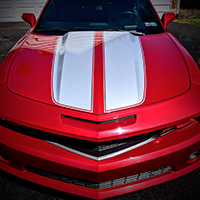
If I post a pic in a thread, how do I make it bigger? Every time I post pics its very small and you have to click to enlarge it. I want it to be like some others that I see where there's no need to click. I've posted a pic in this thread so you know what I mean. I use the attach files option under the go advanced post. Is there another better way to post pics?Thanks in advance for any and all help.

 
Attached Thumbnails Posting pics-img_20150403_162658.jpg  
Old Apr 10, 2015 | 05:21 AM
  #2  
P343's Avatar

Monte of the Month -- February 2015
Monte Of The Month -- April 2017
1 Year Member
iTrader: (1)
Joined: Feb 2014
Posts: 6,949
From: Albany, Indiana
3 Year Member
Default

Once photos are uploaded as thumbnails, right click on the link and click copy shortcut. Then click on the little square that looks like a mountain and sun (the insert image button). Then paste the shortcut in there, click ok, and submit thread.
 
Old Apr 10, 2015 | 08:24 AM
  #3  
ChibiBlackSheep's Avatar

Monte Of The Month -- August 2014
10 Year Member5 Year Member3 Year Member1 Year Member
Joined: Sep 2008
Posts: 25,145
From: Southeast PA
15 Year Member
Default

Also if you host the image on other sites (like photobucket) you can use the

[_img]LINK[_/img]

tags to embed the picture into the post. Just remove the _ in the previous tags
 
Old Apr 10, 2015 | 02:04 PM
  #4  
02ssintimidator's Avatar
Thread Starter
|
Monte Of The Month -- July 2015
Joined: Mar 2015
Posts: 893
From: East Tennessee
1 Year Member
Default

 
Old Apr 10, 2015 | 02:06 PM
  #5  
02ssintimidator's Avatar
Thread Starter
|
Monte Of The Month -- July 2015
Joined: Mar 2015
Posts: 893
From: East Tennessee
1 Year Member
Default

test
 
Old Apr 10, 2015 | 02:08 PM
  #6  
02ssintimidator's Avatar
Thread Starter
|
Monte Of The Month -- July 2015
Joined: Mar 2015
Posts: 893
From: East Tennessee
1 Year Member
Default

test
 

Last edited by ChibiBlackSheep; Apr 10, 2015 at 02:38 PM.
Old Apr 10, 2015 | 02:08 PM
  #7  
02ssintimidator's Avatar
Thread Starter
|
Monte Of The Month -- July 2015
Joined: Mar 2015
Posts: 893
From: East Tennessee
1 Year Member
Default

I must still not be doing something right
 
Old Apr 10, 2015 | 02:39 PM
  #8  
ChibiBlackSheep's Avatar

Monte Of The Month -- August 2014
10 Year Member5 Year Member3 Year Member1 Year Member
Joined: Sep 2008
Posts: 25,145
From: Southeast PA
15 Year Member
Default

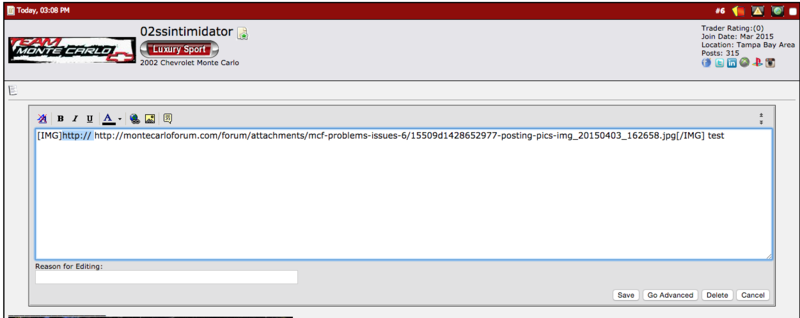
You had an extra http:// in your link so it wasn't working.

See below:

Name:  Screen%20Shot%202015-04-10%20at%203.38.09%20PM_zpsyufcsjj5.png
Views: 49
Size:  62.6 KB

I edited your post, and removed that section and the image showed up
 
Old Apr 10, 2015 | 06:31 PM
  #9  
02ssintimidator's Avatar
Thread Starter
|
Monte Of The Month -- July 2015
Joined: Mar 2015
Posts: 893
From: East Tennessee
1 Year Member
Default

test
 
Old Apr 10, 2015 | 06:32 PM
  #10  
02ssintimidator's Avatar
Thread Starter
|
Monte Of The Month -- July 2015
Joined: Mar 2015
Posts: 893
From: East Tennessee
1 Year Member
Default

Good deal chibi, thanks for your help.


All times are GMT -5. The time now is 06:57 AM.